Doug Brooks: "Stop thinking about current density!"
January 17, 2024 19:00 to 20:00 CET 1:00 pm-2:00 pm EST
sign up here: Register
Thermal Risk Management in Electronics
Doug Brooks: "Stop thinking about current density!"
January 17, 2024 19:00 to 20:00 CET 1:00 pm-2:00 pm EST
sign up here: Register
TRM continues to evolve. Release number 3.8 is now available
To request a test installation, please go to Request form
Do you know about the true origin of this diagram?
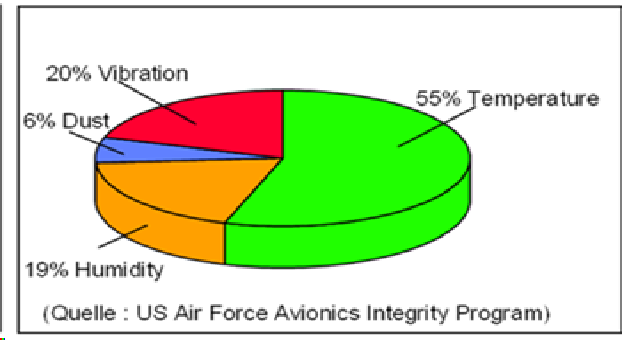
If you want to know, please send an email to info@adam-research.de
Thermo-Electric Circuit Board Simulation with
TRM3.7
Components and currents heat the PCB (assembly) - but how hot will it get? Are the temperature limits complied with? No data sheet or guideline will tell you.
With TRM (Thermal Risk Management) you are able to calculate the thermal performance of your circuit board before the laboratory test
… and with new TRM 3.7 it's even easier to generate a better temperature forecast. Made easier than with add-ons of the big EDA vendors.
• Import your Gerber, placement, drill files or netlist or set the necessary data manually (see FAQ)
• 3D circuit board model with up to 50 layers
• Update: Easy export and import for ALTIUM users
• NEW: Easy export and import for EAGLE users
• Clearly arranged operation
• Templates and file formats for parameter input
• Can also be used without CAD data - for technologists
• No FEM knowledge required
________________________________________
• Accuracy through physics and geometry
• Heating by components and/or currents
• Environmental conditions. Air cooling, heat sinks and heat sinks, radiation into a vacuum, and much more
• Virtual thermograms of all layers and prepregs in high resolution
• DC potential distribution and current density in nets
• Steady-state or transient
• Temperature-dependent material data
• Self and mutual inductance (inductance matrix)
• Automatically generated result tables
________________________________________
• Licensing by your server
• Short to moderate computing time on laptop and PC
Request a free Trial installation ar a webdemo .
YouTube: https://www.youtube.com/channel/UCFEwDzwApUYntiE__kJnJJQ
Good news for board designers using Autodesk's EAGLE or Fusion 360!
Transfer board data in 2 clicks and start a thermal simulation with TRM. The first action starts a special export, the second one an import wizard in TRM. Layer stackup, holes, netlist and components are automatically merged into an assembly model. Then just assign the most relevant Watts and/or Amps - done.
Request a test installation or an online demo by email to info@adam-research.de
Printed circuit boards with many layers, fine x-y resolution or large "pie trays" pose a numerical challenge. Up to now it was like this: the more temperature nodes to solve, the more iterations were required and it was not unlikely that unstable convergence would occur (has been got under control by internal repair mechanisms).
With Release TRM3.6, a new "Turbo" algorithm has been added, which solves the 3D temperature field about 10x faster than before. By activating multi-threading, you can possibly get even more out of it. Really demanding projects are now completed in tens of minutes instead of one or more hours.
Ask for a test installation here
My friend and colleague Doug Brooks has decided to take retirement. Therefore he has summarized his best articles and parts of his books in a new work "UltraCAD's Best".
Doug Brooks: UltraCAD's Best
Also, his calculation tools are now available for FREE instead of $250:
FREE: UltraCAD tools and calculators
Let's wish Doug lots of good times with his (big) family!
TRM3.5.7 was released on 10.11.2021. At first glance, the differences seem to be small. But TRM has become much more performant for very large or high resolution boards (> 10 megapixels per layer, many layers or tens of thousands of laser vias). Also, once again some dialects in the input files are better interpreted.
You may request a test installation here
Doug Brooks has revised his previously self-distributed book on Amazon and it is now available from Artech House.
PCB Design Guide to Via and Trace Currents and Temperatures
Explores how hot traces and vias will be and what board, circuit, design, and environmental parameters are the most important;
● Covers PCB materials (copper and dielectrics) and the role they play in the heating and cooling of traces;
● Details the IPC curves found in IPC 2152, the equations that fit those curves and computer simulations that fit those curves and equations;
● Presents sensitivity analyses that show what happens when environments are varied, including adjacent traces and planes, changing trace lengths, and thermal gradients;
● Explores via temperatures and what determines them, along with fusing issues and whether we can predict the fusing time of traces;
● Readers learn how to measure the thermal conductivity of dielectrics and how to measure the resistivity of copper traces and why many prior attempts to do so have been doomed to failure.
He also uses TRM and outlines the process of model building.
https://us.artechhouse.com/PCB-Design-Guide-to-Via-and-Trace-Currents-and-Temperatures-P2191.aspx
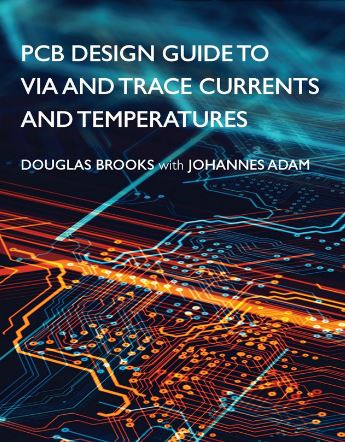
You may also be interested in other titles from the Artech range.